
ecc FSEngineering service with our own software

From the PLC code
to the functional specification.

A service by ecc for operators of existing plants whose program has been changed over the years and whose functional specification is missing or out of date. Software of our own reads the existing PLC program and structures the FS from it. Engineers from ecc review it in a comment and revision round; only then is it released.

Walkthrough

A job in ecc FS, step by step.

Six steps from the sources to the released FS. You see what the software does and where the engineer decides. The example, the step sequence of a CIP cleaning in STEP 7, is fictitious.

ecc FS Job FS CIP unitExample ecc engineer

Step 1 of 6ecc engineer

Create the job, upload the sources

The operator hands over the PLC program of the plant, the symbol table and the I/O list. An engineer from ecc creates the job and uploads the sources.

New jobcreated
Job
FS CIP unit
Plant
CIP unit, existing
Controller
SIMATIC S7-300, STEP 7
Languages
STL and SCL
Template
ecc format, 11 chapters
Questions to
Operator, ecc engineer
Sources0 of 3

Drag program, symbol table and I/O list here

  • CIP_Anlage_Quellen.zipwaitingSTEP 7 source, STL and SCL · 1.2 MB
  • Symbolliste_CIP.sdfwaitingSymbol table · 84 KB
  • IO-Liste_CIP.xlsxwaitingI/O list · 46 KB

No source uploaded yet.

Step 2 of 6Software

Read and structure

The software reads the program and assigns it to the 11 chapters of the FS. Tags and symbol names stay as they are in the program. What the code does not state unambiguously becomes an open point.

Read and structure0 %
  1. Read the programSTL and SCL, blocks and networks
  2. Take over namesTags and symbol names from the symbol table and I/O list
  3. Recognise logicstep sequences, interlocks, alarms
  4. Assign chaptersaccording to the structure of the FS
  5. Collect open pointswhat the code does not state unambiguously
Foundin the whole program
0BlocksOB · FB · FC · DB
0NetworksSTL and SCL
0Steps1 step sequence
0SignalsE 28 · A 18
0InterlocksChapter 4
0Questions2 of them mandatory

Assignment to chapters

  • FB 120CIP_Schrittkette6 Step sequences
  • FC 31Caustic temperature5 Functions
  • E 10.2LS_Lauge_Min4 Interlocks
  • M 40.7CIP_Stoerung7 Alarm list
  • DB 200Interface to control system8 Communication signals
  • OB 1Call structure10 Project integration

Step 3 of 6ecc engineer, with the operator

Answer the questions

Every open point comes as a question, with a reference into the program, a reason and a proposal. Emergency stop behaviour, interlocks and fault reactions are mandatory questions. The engineer accepts the proposal, chooses a different answer or writes their own.

R-01Mandatory questionInterlock · to operator and ecc engineer

Does LS_Lauge_Min carry 1 when the level is above or below minimum?

Reference · FB 120, network 2, line 10

9U"T_Vorspuelen"
10U"LS_Lauge_Min"E 10.2
11S"S2_Lauge"M 41.2
Why it matters

The signal enables step S2. Whether S2 also starts with an empty caustic tank depends on the signal sense.

Proposal

1 = level above minimum. The signal is an enable in an AND operation.

R-02Mandatory questionFault reaction · to operator and ecc engineer

Does the heating enable CIP_Heizung_Frg have to switch off on a group fault?

Reference · FB 120, network 5, line 30, and network 6

30UN"CIP_Stoerung"M 40.7
31="CIP_Vorlauf_Pumpe"A 4.0

Network 6

32U"S2_Lauge"
33="CIP_Heizung_Frg"A 4.3
Why it matters

The supply pump switches off on a group fault, the heating enable does not. Whether that is intended, the code does not say.

Proposal

List as a deviation in chapter 11. The operator decides on a change to the program.

R-03AssumptionPurpose of an interlock · to operator and ecc engineer

Does V_Produkt_offen lock the supply pump so that no cleaning solution gets into the product line?

Reference · FB 120, network 5, line 29

29UN"V_Produkt_offen"E 9.3
30UN"CIP_Stoerung"M 40.7
31="CIP_Vorlauf_Pumpe"A 4.0
Why it matters

The lock is in the code, its purpose is not. Without the purpose, a change to the interlock can hardly be assessed.

Proposal

Confirm the assumption. Name and position of the lock fit this purpose.

Step 4 of 6Software

FS draft with origin

Chapter by chapter, revision A is created, with the tags and symbol names of the program. Every line shows which code lines it comes from and which answer from step 3 has gone into it. Select a line to see its origin.

FB 120 “CIP_Schrittkette”STL
1U"CIP_Start"E 12.0
2U"S0_Grundstellung"M 41.0
3UN"CIP_Stoerung"M 40.7
4S"S1_Vorspuelen"M 41.1
5R"S0_Grundstellung"
6U"S1_Vorspuelen"
7LS5T#3M
8SE"T_Vorspuelen"T 12
9U"T_Vorspuelen"
10U"LS_Lauge_Min"E 10.2
11S"S2_Lauge"M 41.2
12R"S1_Vorspuelen"
13U"S2_Lauge"
14U"Temp_Lauge_erreicht"M 42.1
15LS5T#10M
16SE"T_Halte_Lauge"T 21
17U"T_Halte_Lauge"
18S"S3_Zwischenspuelen"M 41.3
19R"S2_Lauge"
20U"S2_Lauge"
21LS5T#20M
22SE"T_Ueberw_S2"T 22
23U"T_Ueberw_S2"
24S"CIP_Stoerung"M 40.7
25U(
26O"S1_Vorspuelen"
27O"S2_Lauge"
28)
29UN"V_Produkt_offen"E 9.3
30UN"CIP_Stoerung"M 40.7
31="CIP_Vorlauf_Pumpe"A 4.0
32U"S2_Lauge"
33="CIP_Heizung_Frg"A 4.3
Answers from step 3
FS draftRev. A
Chapter0 of 11

4Enables / interlocks

4.1LoadSupply pump CIP_Vorlauf_Pumpe, A 4.0ConditionRuns in S1 and S2. Locked as long as V_Produkt_offen (E 9.3) is present or the group fault CIP_Stoerung (M 40.7) is set. R-03
4.2StepS2 CausticConditionTransition to S2 only with LS_Lauge_Min (E 10.2). R-01
4.3LoadHeating enable CIP_Heizung_Frg, A 4.3ConditionEnable in S2. R-02

6Step sequences

6.1 CIP cleaning, FB 120

S0 Initial positionActionsnone in the excerptTransitionCIP_Start (E 12.0) and no group fault → S1Monitoringnone
S1 Pre-rinseActionsSupply pump ONTransitionRinse time 3 min (T 12) elapsed and LS_Lauge_Min → S2Monitoringnone
S2 CausticActionsSupply pump ON, heating enable A 4.3TransitionTemp_Lauge_erreicht (M 42.1, from FC 31) and holding time 10 min (T 21) → S3Monitoring20 min (T 22), then group fault M 40.7

11Open points / assumptions

OP-01Mandatory questionInterlock R-01
OP-02Mandatory questionFault reaction R-02
A-01AssumptionPurpose R-03

Step 5 of 6Engineers from ecc

Comment and revision round

Engineers from ecc review the draft and comment on individual lines. From the comment, the software creates revision B and marks the difference to revision A. The engineer accepts the change.

Chapter 6 · Step sequences

6.1 CIP cleaning, FB 120

S0 Initial positionActionsnone in the excerptTransitionCIP_Start (E 12.0) and no group fault → S1Monitoringnone
S1 Pre-rinseActionsSupply pump ONTransitionRinse time 3 min (T 12) elapsed and LS_Lauge_Min → S2Monitoringnone
S2 CausticActionsSupply pump ON, heating enable A 4.3TransitionTemp_Lauge_erreicht (M 42.1, from FC 31) and holding time 10 min (T 21) → S3Monitoring20 min (T 22), then group fault M 40.7 1
Comments1 open

ecc engineerReview

on 6.1 S2 · Monitoring

Name the group fault with its symbol name and add the consequence.

  1. ADraft from the program, with the answers R-01 to R-03
  2. BComment round, 6.1 S2 supplemented

Step 6 of 6ecc engineer

Release and output as Word

The engineer releases revision B. The FS is output as a Word document in the ecc format, with letterhead, revision table and table of contents. Whatever remains open is listed in chapter 11.

Functional specification

CIP unit

Plant:
CIP unit, existing (example)
Basis:
PLC program STEP 7, symbol table, I/O list
Revision:
B
Status:
reviewed, release open

Revisions

Rev.DateChange
A28.10.2026Draft from the program, questions R-01 to R-03
B30.10.2026Comment round, 6.1 S2 supplemented

FS CIP unit · Rev. BPage 1

Contents

  1. 1Introduction
  2. 2Overview
  3. 3General plant functions
  4. 4Enables / interlocks
  5. 5Functions
  6. 6Step sequences
  7. 7Alarm list
  8. 8Communication signals
  9. 9General properties
  10. 10Project integration STEP 7
  11. 11Open points / assumptions

FS CIP unit · Rev. BPage 2

Sources: 0 of 3Example · no project data
Fig. 1A job in ecc FS, drawn as a window of the software used, in six steps from the sources to the released FS. On a wide screen, Next, Back, the step dots and the step bar in the window guide you through the process. Play shows it as a film, with a mouse pointer taking over the engineer's clicks. On the phone, the six steps are listed one below the other. Fictitious example for this page, not a customer plant · file names, figures and data are example values · as of 31 Oct 2026 STL: U and UN and not O or S set R reset = assign L load SE on-delay timer
Why operators need the FS

Anyone who changes, tests or converts a plant needs its functional specification.

Change control and requalification
Anyone who changes the program assesses the change against the described function and determines what has to be retested. That requires an FS that matches the code.
Migration
When switching over, for instance from S7-300/400 to S7-1500, the FS describes what the new program has to do. It is the specification for the implementation and the yardstick for the test.
Troubleshooting
In the event of a fault, the FS shows steps, transition conditions and interlocks in plain language, with the same symbol names as in the program.
Knowledge transfer
If the original programmer is no longer available, the knowledge about the plant is locked in the code. The FS makes it readable for operation, maintenance and new engineers.
Specification chain according to GAMP 5
In the GAMP 5 model, the FS belongs to the specification between URS and design. If it is missing or out of date, this link is created from the code (Fig. 2).

New plant

URSRequirement
FSFunction
DSDesign
CodeProgram

Existing plant

URSRequirement
FSfrom the code
DSDesign
Codeexisting
Specification before the codeFS from the existing program
Fig. 2Specification chain according to GAMP 5, simplified: requirement (URS), function (FS), design (DS), program. On the left the new plant, where the FS is created before the code. On the right the existing plant whose FS is missing or out of date. There, ecc creates the FS from the program. Scheme based on ISPE GAMP 5 · own representation
Scope of delivery

The FS comes as a Word document in the ecc format, in 11 chapters.

Chapters 4 to 6 carry the logic of the plant, chapters 7 and 8 alarms and communication signals. Chapter 11 collects what the code leaves open.

Functional specification

CIP unit · Example

Basis:
PLC program STEP 7 with symbol table and I/O list
Format:
Word, ecc format
Status:
released after comment and revision round

Contents

  1. 1Introduction
  2. 2Overview
  3. 3General plant functions
  4. 4Enables / interlocks
  5. 5Functions
  6. 6Step sequences
  7. 7Alarm list
  8. 8Communication signals
  9. 9General properties
  10. 10Project integration STEP 7
  11. 11Open points / assumptions
Chapters 4 to 6

The logic from the code

Enables, interlocks, functions and step sequences, with the tags and symbol names of the program. Excerpt in Fig. 1, step 4.

Chapter 11

What the code leaves open

Every open point is listed here and goes as a question to the operator and the engineer. Assumptions are marked as assumptions.

Fig. 3Table of contents of the delivered functional specification, drawn after the letterhead of the ecc documents. In green the chapters with the logic from the program, in amber the chapter for open points and assumptions. Structure as delivered · header data as an example
Limits

What the software does not do.

An FS is only as reliable as its source. That is why the software ecc uses for it works according to four rules.

  • It does not guess.

    What the code does not state unambiguously is listed as an open point in chapter 11 and goes as a question to the operator and the engineer.

  • It claims nothing the code does not support.

    What neither the program nor the symbol table or the I/O list supports is listed in chapter 11, marked as an assumption.

  • It renames nothing.

    Tags, symbol names and number ranges appear in the FS exactly as they appear in the program. Every point can be found again in the code.

  • It releases nothing on its own.

    Engineers from ecc review the FS in a comment and revision round. Only then is it released.

Collaboration

A service with our engineers.

You give us the program, we deliver the reviewed FS. Our own software reads and structures, engineers from ecc review, clarify the questions with you and release.

From you

  • PLC program of the plant, e.g. STEP 7 in STL and SCL
  • Symbol table
  • I/O list
  • Contact person for the questions from chapter 11

From us

  • Structuring of the program with our own software
  • Questions on everything the code leaves open
  • Comment and revision round with engineers from ecc
  • Released FS as a Word document in the ecc format
Software · ecc OS

The project operating system for commissioning and qualification.

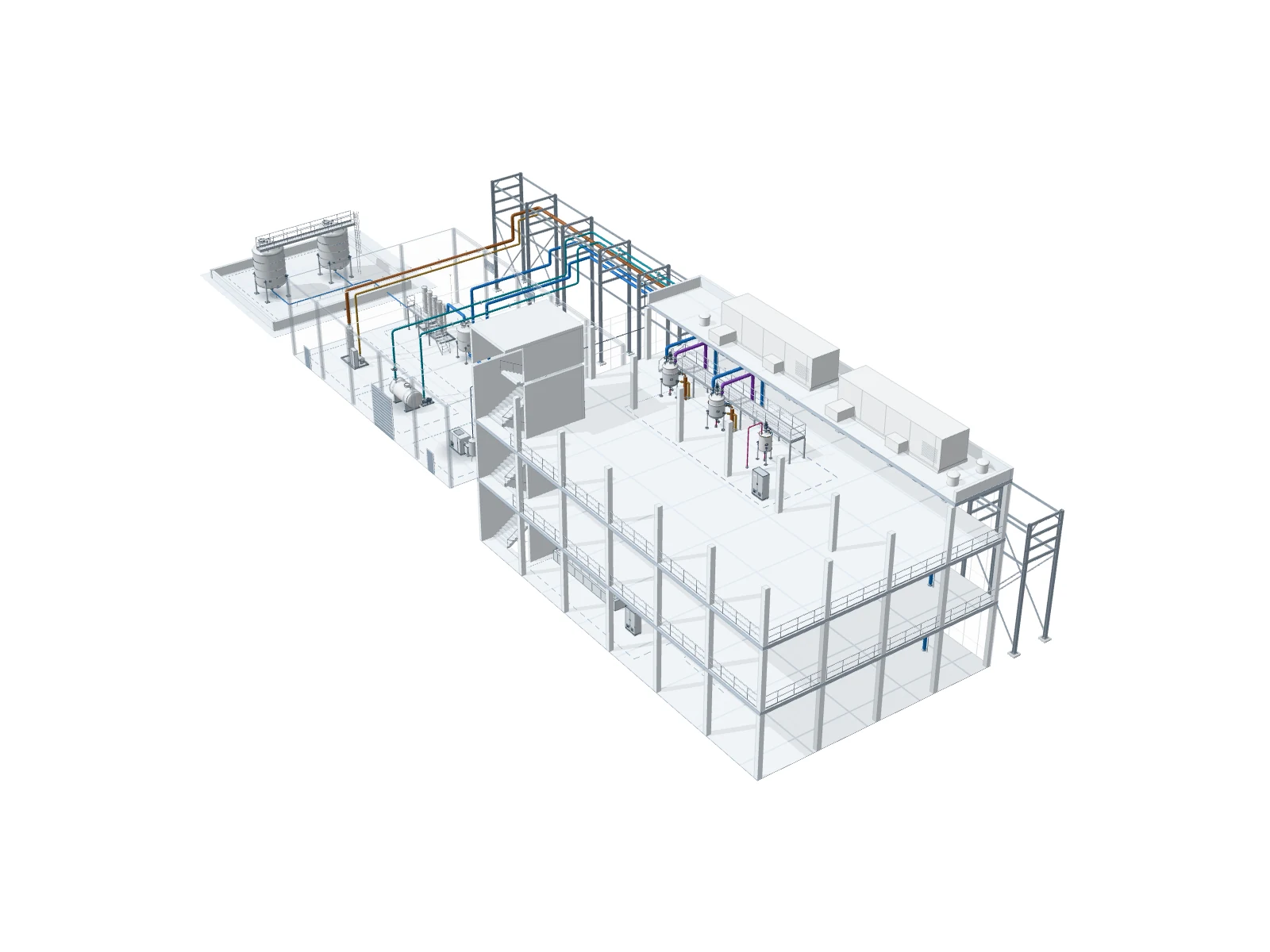
ecc OS represents the plant as a system: system list, plant model in 3D and as a flow diagram, test documents with electronic signature, handover and operation. Developed by ecc in-house; our own projects run on it.

Windows · macOS · iPhone & iPad · Android · Browser

Plant model of an example plant in ecc OS
Example plant · no project data
Fig. 4ecc OS, plant model of the example plant of this website: 3 buildings · 9 subsystems · 20 elements · 19 lines · 8 media. Example plant · no project data · scale bar and north arrow follow the camera